Saturday, October 9, 2010


Sunday, May 23, 2010
Non Linear (Digital )Editing
The tutorial provides introdution to the world of computer-based digital video editing, known as the non-linear editing. You will learn how to set up the computer editing system, to record footage from a camera or video device on your hard drive, for editing and recording footage back to tape or disk.
Can be edited with a computer to be a complex process. This tutorial provides an over view and general instructions - you may need to consult the evidence or support forums for some of the tasks related to the specific hardware and software for you.
NOTE: Before you try this type of editing, and it pays to understand how it works linear editing.
Can be edited with a computer to be a complex process. This tutorial provides an over
view and general instructions - you may need to consult the evidence or support forums for some of the tasks related to the specific hardware and software for you. NOTE: Before you try this type of editing, and it pays to understand how it works linear editing.
The establishment of a non-linear editing suite
For video editing on your computer you will need:
* A source device to run the original tape or disk. Usually a VCR or a camera.
* A computer with at least these specifications: 200 MHz / 64 MB of RAM / hard drive with a fast 1 GB or more free space.
Note: If you want decent results, you will need higher standards than that. Some editing software and requires high-performance computer to work up correctly.
Video recording device.
To capture video from an analog source (such as VHS or Video8) you need a device to convert video to digital format. This can be a device independent plugs in your computer or video capture card which becomes part of your computer.
If you use a source which outputs a digital signal (such as Firewire or through) that do not need a capture device, but you need to make sure your computer has the appropriate inputs are available.
* Connect the leads to connect the source device in your capture device or computer.
* Programs(Software) to control the capture, edit and output.
* A video screen(Monitor) (or TV).
We will return to the program on the next page. First, let's have a look at hardware and physical connections. There are different options depending on your equipment.
Camera and computer
The most common system in cases of non-professional to fill a video camera directly to your computer through the FireWire connection or USB. This is a digital communications and allows yo u to "dump" snapshots directly from your camera to your hard drive. This is a convenient and inexpensive way to work. Consult the manual camera for details.
If the camera does not have a digital output but has analog AV outputs, you can use your capture device. Follow the following example, using the camera in place of the VCR.
If the camera does not have any video output at all, you will need to use a video source device.
The following example illustrates the use of a video source for the device, connected to a computer with a capture card. Video monitor (or TV) is used to monitor the images. Can monitor the audio with the TV speakers, and a separate sound system or headphones. Edit the setup using one of the VCR, computer, and monitoring
(1) If the video device and two or more of the output of vehicles, and use one of them, to plug the introduction of vehicles for monitoring. If you have only one AV output, and use the RF (aerial) output instead, and use of compounds resulting from the next step.
(2) vehicles, the second output of plugs in the VCR input from vehicles capture card computer.
 (3) and compounds resulting from the burning vehicles in the capture card input from the VCR.
In this system, played footage from the video device to the computer, edit, and then play again from the computer to the VCR (for recording).
Computer and the Two VCRs
This system is a little more detailed, and has features like the ability to record directly from your video and one for editing (non-linear). Also, if the computer and the appropriate hardware, can be used to overlay graphics in real time as you are one of recording devices to another. Edit the setup using two VCRs, and computer, and monitoring
VCR higher is the source device, and the bottom of the video is recorded.
(1) resulting from the combustion of compounds
 VCR record in the introduction of vehicles for monitoring.
(2) and compounds resulting from the source in the
socket input devices for vehicles from capture card computer.
(3) and compounds resulting from combustion
capture card entry for the vehicles of the recording devices.
(4) vehicles second (or RF) output for a source
of ignition devices in vehicles for the second (or RF)
contribution from a video record.
Recording devices, select the appropriate entry to register from a computer or video source.
Note: You can also use a second (or third) of the AV
output from another source to feed the surface of the video monitor.
An example of the Edit suite home
 If you want to be adventure, the possibilities are endless.
Edit suite includes all below the level of consumer
and professional equipment. It can be used to
edit home movies, DVD, TV-quality, Internet and written materials .
Video Editing Softwares
 Report any video editing software to use is not an easy one. A wide range of applications available to the most basic, such as Windows Movie Maker to professional packages such as Final Cut Pro, MediaStudio Ulead and Adobe Premiere.
For most people, the main obstacle is money.
Good editing software is expensive and often requires
high-priced computer to run effectively. It is clear
that the more money you can spend on better,
but you can achieve reasonable results with the
software cost less than a dollar and US500.
Programs are very cheap or free (like Windows Movie Maker) tend to be very limited and impractical to some extent. If you are in every serious, you'll need to spend some money.
Note that many of the capture devices and cameras come with software to their own liberation, or perhaps a limited version of a package of career. To start and this can be an effective means in terms of cost.
How Editing Software works
For video editing on your computer you will need:
* A source device to run the original tape or disk. Usually a VCR or a camera.
* A computer with at least these specifications: 200 MHz / 64 MB of RAM / hard drive with a fast 1 GB or more free space.
Note: If you want decent results, you will need higher standards than that. Some editing software and requires high-performance computer to work up correctly.
Video recording device.
To capture video from an analog source (such as VHS or Video8) you need a device to convert video to digital format. This can be a device independent plugs in your computer or video capture card which becomes part of your computer.
If you use a source which outputs a digital signal (such as Firewire or through) that do not need a capture device, but you need to make sure your computer has the appropriate inputs are available.
* Connect the leads to connect the source device in your capture device or computer.
* Programs(Software) to control the capture, edit and output.
* A video screen(Monitor) (or TV).
We will return to the program on the next page. First, let's have a look at hardware and physical connections. There are different options depending on your equipment.
Camera and computer
The most common system in cases of non-professional to fill a video camera directly to your computer through the FireWire connection or USB. This is a digital communications and allows yo
u to "dump" snapshots directly from your camera to your hard drive. This is a convenient and inexpensive way to work. Consult the manual camera for details. If the camera does not have a digital output but has analog AV outputs, you can use your capture device. Follow the following example, using the camera in place of the VCR.
If the camera does not have any video output at all, you will need to use a video source device.
Computer and VCR
The following example illustrates the use of a video source for the device, connected to a computer with a capture card. Video monitor (or TV) is used to monitor the images. Can monitor the audio with the TV speakers, and a separate sound system or headphones. Edit the setup using one of the VCR, computer, and monitoring
(1) If the video device and two or more of the output of vehicles, and use one of them, to plug the introduction of vehicles for monitoring. If you have only one AV output, and use the RF (aerial) output instead, and use of compounds resulting from the next step.
(2) vehicles, the second output of plugs in the VCR input from vehicles capture card computer.
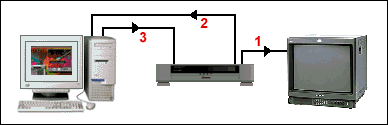 (3) and compounds resulting from the burning vehicles in the capture card input from the VCR.
 In this system, played footage from the video device to the computer, edit, and then play again from the computer to the VCR (for recording).
Computer and the Two VCRs
This system is a little more detailed, and has features like the ability to record directly from your video and one for editing (non-linear). Also, if the computer and the appropriate hardware, can be used to overlay graphics in real time as you are one of recording devices to another. Edit the setup using two VCRs, and computer, and monitoring
VCR higher is the source device, and the bottom of the video is recorded.
(1) resulting from the combustion of compounds
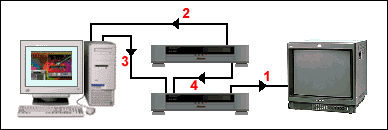 VCR record in the introduction of vehicles for monitoring.
 (2) and compounds resulting from the source in the
socket input devices for vehicles from capture card computer.
(3) and compounds resulting from combustion
capture card entry for the vehicles of the recording devices.
(4) vehicles second (or RF) output for a source
of ignition devices in vehicles for the second (or RF)
contribution from a video record.
Recording devices, select the appropriate entry to register from a computer or video source.
Note: You can also use a second (or third) of the AV
output from another source to feed the surface of the video monitor.
An example of the Edit suite home
If you want to be adventure, the possibilities are endless.Edit suite includes all below the level of consumer
and professional equipment. It can be used to
edit home movies, DVD, TV-quality, Internet and written materials .
Video Editing Softwares
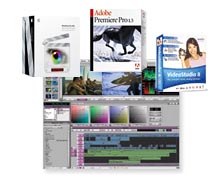 Report any video editing software to use is not an easy one. A wide range of applications available to the most basic, such as Windows Movie Maker to professional packages such as Final Cut Pro, MediaStudio Ulead and Adobe Premiere.
 For most people, the main obstacle is money.
Good editing software is expensive and often requires
high-priced computer to run effectively. It is clear
that the more money you can spend on better,
but you can achieve reasonable results with the
software cost less than a dollar and US500.
Programs are very cheap or free (like Windows Movie Maker) tend to be very limited and impractical to some extent. If you are in every serious, you'll need to spend some money.
Note that many of the capture devices and cameras come with software to their own liberation, or perhaps a limited version of a package of career. To start and this can be an effective means in terms of cost.
How Editing Software works
Linear video editing (tape to tape)
This tutorial will show you how to edit the video and one to another. You will need to:
* Two VCRs (video machines), preferably with AV (audio and video) outputs. If you do not have the output of vehicles, you can use the RF (aerial) output instead.
Note: If you have a video and only one, you can use a video camera and VCR II.
* At least one video monitor, but preferably Mon Professional monitors are the best, but you can use TVs if necessary.
* Cable connection.
* The tape (s) you wish to edit, and a blank tape to edit on (this will become the main strip).
About editing the linear
The linear video editing original writing style, and computers by non-linear editing has become available in the 1990s. These days, many people consider to edit the written be outdated. This is not true in reality. Although the non-linear editing is the preferred method for most projects, and edit written still has a place. See linear versus non-linear editing for more information.
Using a video camera and VCR II.
How to develop a system of editing is very simple without any additional equipment.
Note: Editing with a camera and a video is essentially the same editing with two VCRs, but that the camera will serve as a source VCR.
You will need to:
* Camera with AV (audio-visual) products and the
This tutorial will show you how to edit the video and one to another. You will need to:
* Two VCRs (video machines), preferably with AV (audio and video) outputs. If you do not have the output of vehicles, you can use the RF (aerial) output instead.
Note: If you have a video and only one, you can use a video camera and VCR II.
* At least one video monitor, but preferably Mon Professional monitors are the best, but you can use TVs if necessary.
* Cable connection.
* The tape (s) you wish to edit, and a blank tape to edit on (this will become the main strip).
About editing the linear
The linear video editing original writing style, and computers by non-linear editing has become available in the 1990s. These days, many people consider to edit the written be outdated. This is not true in reality. Although the non-linear editing is the preferred method for most projects, and edit written still has a place. See linear versus non-linear editing for more information.
Using a video camera and VCR II.
How to develop a system of editing is very simple without any additional equipment.
Note: Editing with a camera and a video is essentially the same editing with two VCRs, but that the camera will serve as a source VCR.
You will need to:
* Camera with AV (audio-visual) products and the

ability to read the tapes (most video cameras and can do so).
* VCR. If not have a video of the AV input, you will need to
* VCR. If not have a video of the AV input, you will need to
use the RF (aerial) input. This means that the camera
should be output RF (or adapter). The article will explain the radio frequency soon.
* A video screen (or TV).
* Causes the connection. Unilateralism and editing, you will need one video, audio, one for the each connection. Stereo for editing, you will need one video and two audio leads for each connection. If you are using radio frequency, each carrying one of the leading video and audio for each connection.
In the graph below, each contact appears as a black line and one with an arrow in the direction of the flow signal.
Contact your hardware as shown in the diagram.
(1) of the compounds resulting from the combustion to the camera (2) AV input of the VCR.
(3) compounds resulting from the combustion to the VCR (4) AV input of control. The camera will be the "source" machine, a video and would be "record" the device. This means that you will use a camera and a video driver, and a new recording (editing) a copy of the tape in the VCR.
Select the appropriate input AV "" on both the VCR and monitor.
If you play the tape of the VCR, you should see and hear on the screen. If you stop the tape in the VCR, and play the tape from the camera, you should see and hear the camera tape on the display.
Place the tape to be edited (for "source footage") in the camera. A new situation, a blank tape in the VCR (see also How to prepare a tape recording).
This is where you begin the process of liberalization. There are three types of editing can be done on consumer video equipment: "Group", "insert" and the "voice calls". Compilation of the amendments can be done on any video device, but the introduction of dubbing and audio are only available on video equipment that supports these functions - display manual for details. Should have been edited collection be sufficient for most purposes, the video in the world.
Assembly editor
1. Jog for using a video / shuttle or other controls, locate the point at which you want to edit to start. Put the VCR in pause / record mode.
2. If necessary, put the camera in playback mode so you can run the tape. Using the camera controls, locate the point at which you want to edit to start. Put the camera in a pause.
3. Release from each of the machines pause mode (usually by pressing the buttons and pause.) This will cause the camera to run the VCR to record the start.
Note: There will be a delay on each device when the release of the development and pause, and when the start / registration. You may also find that your video does not start recording exactly where you think it would be. You will need to experience to know the subtleties of the machines on delay. Usually, you may need to pause a little bit devices before or after editing the desired point, and stop the camera for a few seconds before the liberation points.
4. Stop all of the devices when you reach the end of justice.
5. Repeat steps 1-4 for each edit.
Insert editing (video input)
Liberation means the inclusion of the new record images in the middle of existing images. You will need a video with this post - it's usually available only in more expensive models. You'll need to consult the operating manual for specific instructions.
Sound dubbing (insert the sound)
Dubbing sound means to include the new sound on the video found. This can be used, for example, to add music or commentary. Once again, you will need to consult the operating manual for instructions.
* A video screen (or TV).
* Causes the connection. Unilateralism and editing, you will need one video, audio, one for the each connection. Stereo for editing, you will need one video and two audio leads for each connection. If you are using radio frequency, each carrying one of the leading video and audio for each connection.
In the graph below, each contact appears as a black line and one with an arrow in the direction of the flow signal.
Contact your hardware as shown in the diagram.
(1) of the compounds resulting from the combustion to the camera (2) AV input of the VCR.
(3) compounds resulting from the combustion to the VCR (4) AV input of control. The camera will be the "source" machine, a video and would be "record" the device. This means that you will use a camera and a video driver, and a new recording (editing) a copy of the tape in the VCR.
Select the appropriate input AV "" on both the VCR and monitor.
If you play the tape of the VCR, you should see and hear on the screen. If you stop the tape in the VCR, and play the tape from the camera, you should see and hear the camera tape on the display.
Place the tape to be edited (for "source footage") in the camera. A new situation, a blank tape in the VCR (see also How to prepare a tape recording).
This is where you begin the process of liberalization. There are three types of editing can be done on consumer video equipment: "Group", "insert" and the "voice calls". Compilation of the amendments can be done on any video device, but the introduction of dubbing and audio are only available on video equipment that supports these functions - display manual for details. Should have been edited collection be sufficient for most purposes, the video in the world.
Assembly editor
1. Jog for using a video / shuttle or other controls, locate the point at which you want to edit to start. Put the VCR in pause / record mode.
2. If necessary, put the camera in playback mode so you can run the tape. Using the camera controls, locate the point at which you want to edit to start. Put the camera in a pause.
3. Release from each of the machines pause mode (usually by pressing the buttons and pause.) This will cause the camera to run the VCR to record the start.
Note: There will be a delay on each device when the release of the development and pause, and when the start / registration. You may also find that your video does not start recording exactly where you think it would be. You will need to experience to know the subtleties of the machines on delay. Usually, you may need to pause a little bit devices before or after editing the desired point, and stop the camera for a few seconds before the liberation points.
4. Stop all of the devices when you reach the end of justice.
5. Repeat steps 1-4 for each edit.
Insert editing (video input)
Liberation means the inclusion of the new record images in the middle of existing images. You will need a video with this post - it's usually available only in more expensive models. You'll need to consult the operating manual for specific instructions.
Sound dubbing (insert the sound)
Dubbing sound means to include the new sound on the video found. This can be used, for example, to add music or commentary. Once again, you will need to consult the operating manual for instructions.
How to Prepare a Tape for Editing
Exactly how you can set up your tapes and will depend on your circumstances. The following procedure outlines the method for editing a model professional. It's not always necessary to complete all these steps - use your discretion to decide on any appropriate steps for your situation.
1. Make sure that the tape is clean and free of dust.
2. Fast forward the tape to the end, then rewind. This ensures that the tape contains the correct tension.
3. Register "black" from the stable source throughout the entire tape, then rewind. This is extremely important if you plan to use the "Edit Insert", but is not necessary for the "assembly editing" . If you do not know what these terms mean, you probably do not need to do this step.
4. About 30-60 seconds of color bars is configured correctly and the tone of voice at the beginning of the tape. This provides a technical reference for later use.
1. Make sure that the tape is clean and free of dust.
2. Fast forward the tape to the end, then rewind. This ensures that the tape contains the correct tension.
3. Register "black" from the stable source throughout the entire tape, then rewind. This is extremely important if you plan to use the "Edit Insert", but is not necessary for the "assembly editing"
. If you do not know what these terms mean, you probably do not need to do this step. 4. About 30-60 seconds of color bars is configured correctly and the tone of voice at the beginning of the tape. This provides a technical reference for later use.
Thursday, May 13, 2010
Adobe Premiere to import
This short tutorial shows you how to import video clips
This short tutorial shows you how to import video clips
 and other files in Adobe Premiere Pro.
 Display allows you to import a video clip one,
and multiple sections, or a folder full of snapshots.
You can also import a variety of audio and video
files remain, including the sequence of images
and layered Photoshop files.
Select File> Import from the main menu.
To import a single file: Locate and select the file,
Select File> Import from the main menu.
To import a single file: Locate and select the file,
and then click Open.
To import multiple files: Hold down the Control key to select multiple files, and then click Open.
Q: Import a folder of files: Locate and select the folder you want to import, and then click Folder. New bin is created under the project, which contains the contents of the folder.
Note: You can also import files by dragging them from Windows Explorer under the project Premiere.
To import multiple files: Hold down the Control key to select multiple files, and then click Open.
Q: Import a folder of files: Locate and select the folder you want to import, and then click Folder. New bin is created under the project, which contains the contents of the folder.
Note: You can also import files by dragging them from Windows Explorer under the project Premiere.
Supported Formats
Video formats
AVI, MOV, MPEG (MPE,MPG), Open DML, WMV
AVI, MOV, MPEG (MPE,MPG), Open DML, WMV
Audio formats
AIFF, AVI, MOV, MP3, WAV, WMA
AIFF, AVI, MOV, MP3, WAV, WMA
Still-image formats
AI, BMP/DIB/RLE, EPS, FLC/FLI, GIF, ICO, JPEG/JPE/JPG/JFIF, PCX, PICT/PIC/PCT, PNG, PRTL (Adobe Title), PSD, TGA/ICB/VST/VDA, TIFF
AI, BMP/DIB/RLE, EPS, FLC/FLI, GIF, ICO, JPEG/JPE/JPG/JFIF, PCX, PICT/PIC/PCT, PNG, PRTL (Adobe Title), PSD, TGA/ICB/VST/VDA, TIFF
Sequence formats
AI, BMP/DIB/RLE, Filmstrip, Animated GIF, PICT/PIC/PCT, TGA/ICB/VST/VDA, TIFF, PSD
AI, BMP/DIB/RLE, Filmstrip, Animated GIF, PICT/PIC/PCT, TGA/ICB/VST/VDA, TIFF, PSD

Adobe Premiere is a video editing software package
suitable for both amateurs and professionals.
And can be purchased and used alone, or together
with other applications such as Adobe Photoshop,
After Effects, etc..
This page provides an overview of the very show.
This page provides an overview of the very show.
For more detailed information see the lessons Premiere
or more from the lessons of liberalization in general.
How does the Premier?
Like most editing programs and premiere works by
How does the Premier?
Like most editing programs and premiere works by
importing video from a source such as a video on the
hard disk drive, and then allows you to create a new, revised versions that you can export back to tape, disk or other medium.
How good is the premiere?
The first offer is a powerful editing tool, able to produce quality broadcasting and high-definition video. It is a package that is very popular among video enthusiasts and professionals, although usually prefers other packages to the level of the very top of the television production.
The first offer has a nice clean interface which is relatively easy to use for people of all skill levels.
What can we offer does not?
* Import video, audio and graphics in a wide range of formats.
* Edit, process and arrangement of these elements in the visual timetable.
* Add effects and filters, titles, etc..
* Export video editing in a variety of formats, including recordings, videos, and domestic violence, DVD, and video formats commonly the Internet.
Premiere can not be you?
Although the first offer to do all common tasks and editing is suitable for most cases, if you are looking for a solution to high performance and must note the following:
* Built-in address is a manufacturer of fine for most titles, but not as advanced, in particular.
* The first offer has some good audio mixing features, effects, sound editing, but seriously you will need to proper application of the specialized (such as Adobe Audition or Soundbooth).
* And a set of transitions and special effects and medium only in accordance with professional standards more (available from third party suppliers).
Some of the features do not exist by design, encouraging you to buy separate products such as Adobe After Effects (special effects), handsome (DVD authoring) and test (sound). The good news is that if you really need these features, you can purchase many of the Adobe products in the various packages that give you a very strong production of a very reasonable price.
Note: the version of Premiere CS3 and ships with a handsome (DVD) for the recruitment and (capture file, Windows only). What are the cost of the show?
Premiere is the application of mid-range. If budget is your main concern, you can find probably the cheapest thing to suit your needs. Conversely, if the budget is not an issue and performance is critical, you can pay several times the price of the first presentation of the very best systems.
In our opinion, the premiere is good, and the option of cost-effective for most cases of liberation. Summary
The Adobe Premiere on for a long time and the user base is very stable. It is a solid, and the application on a professional level that will be more than enough for most cases of liberation.
How good is the premiere?
The first offer is a powerful editing tool, able to produce quality broadcasting and high-definition video. It is a package that is very popular among video enthusiasts and professionals, although usually prefers other packages to the level of the very top of the television production.
The first offer has a nice clean interface which is relatively easy to use for people of all skill levels.
What can we offer does not?
* Import video, audio and graphics in a wide range of formats.
* Edit, process and arrangement of these elements in the visual timetable.
* Add effects and filters, titles, etc..
* Export video editing in a variety of formats, including recordings, videos, and domestic violence, DVD, and video formats commonly the Internet.
Premiere can not be you?
Although the first offer to do all common tasks and editing is suitable for most cases, if you are looking for a solution to high performance and must note the following:
* Built-in address is a manufacturer of fine for most titles, but not as advanced, in particular.
* The first offer has some good audio mixing features, effects, sound editing, but seriously you will need to proper application of the specialized (such as Adobe Audition or Soundbooth).
* And a set of transitions and special effects and medium only in accordance with professional standards more (available from third party suppliers).
Some of the features do not exist by design, encouraging you to buy separate products such as Adobe After Effects (special effects), handsome (DVD authoring) and test (sound). The good news is that if you really need these features, you can purchase many of the Adobe products in the various packages that give you a very strong production of a very reasonable price.
Note: the version of Premiere CS3 and ships with a handsome (DVD) for the recruitment and (capture file, Windows only). What are the cost of the show?
Premiere is the application of mid-range. If budget is your main concern, you can find probably the cheapest thing to suit your needs. Conversely, if the budget is not an issue and performance is critical, you can pay several times the price of the first presentation of the very best systems.
In our opinion, the premiere is good, and the option of cost-effective for most cases of liberation. Summary
The Adobe Premiere on for a long time and the user base is very stable. It is a solid, and the application on a professional level that will be more than enough for most cases of liberation.
Subscribe to:
Comments (Atom)